Anthropic targets workplace collaboration with Claude Meetings
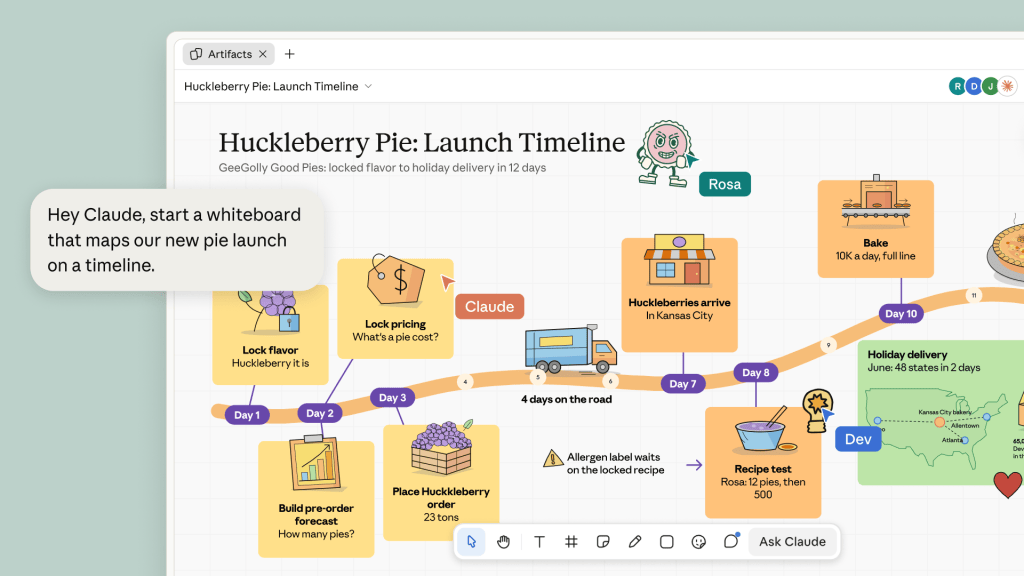
Anthropic has expanded the range of productivity and collaboration features in Claude with the launch of spreadsheet, whiteboard, and meeting assistant tools aimed at knowledge workers. The features add to the Claude Docs and Slides features announced in September, as Anthropic equips its AI assistant for a wider range of productivity tasks. “Anthropic is moving Claude from a place you go to ask a question to a place where teams do their work,” said Craig Durr, chief analyst at The Collab Collective. One of the new tools announced Tuesday is Claude Meetings. This lets users add Claude to video meetings, where it takes notes, answers questions in the call’s chat interface, retrieves information from connected apps, and creates project plans and timelines. After a call, notes and action items are available in claude.ai, the browser-based version of Claude. Claude Meetings is reportedly accessible only in Google Meet currently; Anthropic hasn’t responded to a request for further details The launch of Claude Meetings highlights the “continued value of leveraging context within meetings to improve workflows,” said Irwin Lazar, principal analyst at Metrigy. Claude Meetings has similar functionality to existing meeting assistants, such as Copilot in Microsoft Teams, Zoom My Notes, and Webex’s meeting agent, he said, and also competes with standalone meeting assistants, such as Otter and Granola. “As Claude increasingly becomes the place where people are doing their work, it makes sense for Claude to have direct access to meeting notes without requiring cut/paste, or MCP access, which vendors like Zoom now charge for,” said Lazar. But while Anthropic is increasingly seeking to compete with office productivity suites, he doesn’t expect the company will venture further into developing collaboration and communication software any time soon. Email, calling, and video meeting software “all require far more extensive capabilities and infrastructure,” he noted. For IT teams that enable Claude Meetings, Durr recommends establishing procedures for obtaining meeting participants’ consent to its presence, in accordance with local laws. It already requires admin approval to attend calls including external guests; if approval is not granted, it will leave the meeting. “Claude identifies itself and posts a notice in the meeting chat, but recording and consent rules vary by jurisdiction and by company policy,” he said. “IT, legal, and HR should agree on when Claude is allowed into a meeting before it’s rolled out.” IT teams should also monitor the availability of new functions that might change the way Claude Meetings functions, Durr advised. The tool currently only acts when instructed by users, but could become “more proactive” over time, according to an Axios report that quoted Nicholas Lin, a product leader at Anthropic. “I’d watch that closely,” said Durr. “A meeting participant that acts on its own is a different product, and it starts a different governance conversation.” Claude Meetings is available in beta for customers with Claude Team and Enterprise payment plans. The feature is on by default for Claude Team customers. Other Claude features announced Tuesday include Claude Whiteboard, a shared canvas for coworkers to use while brainstorming. Teams can discuss ideas and Claude turns this into a board with a timeline, task owners, and due dates. Anthropic Currently in beta for paid Claude plans, Claude Whiteboard is available in web, mobile, and desktop. Customers on Claude Team and Enterprise plans can also access whiteboards inside Claude Meetings. Claude Sheets, a collaborative spreadsheet tool, is also available in beta, while Claude Data, a tool for creating interactive visual charts and reports that was previously called Claude Dashboards, is now generally available. Both are included in paid Claude subscriptions. Anthropic Finally, Anthropic announced updates to its “interactive connectors” that embed third-party applications within Claude. Following the feature’s initial launch in January, which enabled access to other apps from the Claude chat interface, the updated connectors let users open full versions of supported applications, either alongside a Claude conversation or in full-screen view. Users can also ask Claude to make changes to the embedded app, such as editing a document or retouching an image. Applications from a small number of software vendors are available initially, Anthropic said, including Adobe, Box, and Notion. Interactive connectors are available in all Claude plans on the web and in the desktop app. The connectors follow existing user permissions around file access, and admins can limit what each connector does.
This is a summary aggregated from Computerworld. Read the complete article on the original site:
Read full article at Computerworld